How do I send a GIF in Microsoft Teams?
To send a GIF in Microsoft Teams, click the GIF button below the compose box, search or pick a GIF, and press Enter. On Windows, you can also press Win + . (period) to open the emoji and GIF picker. If GIFs are missing, your admin may have disabled them, or you can use the shortcut as a workaround.
Send this thumbs up when you want to say “got it” or “nice work” without typing.
Use this “let’s go!” drawing when a project kicks off or a meeting ends early.
This facepalm is perfect when someone shares a obviously broken process in the chat.
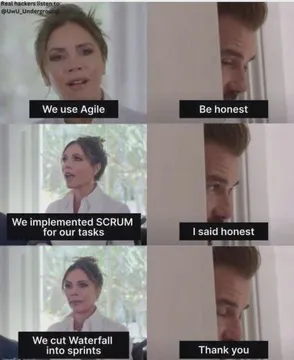
Send this stern “thank you” when you need to acknowledge help with a bit of dry humor.
This is fine when the deadline is close and the build is still red.
Triple facepalm for when the whole team misses the same obvious bug.
A cartoon hamster with open arms says “thank you” in a cute, friendly way.
Bugs Bunny in a tuxedo for a smug “let’s go, bois” before a big release.








Two ways to insert a GIF in Teams
In a chat or channel, click the GIF button (it looks like a small animation icon) under the message box. Type a keyword in the search bar, pick a GIF, and it will be added to your message. Press Enter to send.
On Windows, press Win + . (period) to open the emoji picker, then switch to the GIF tab. This works even when the GIF button is missing from the compose box.
Why GIFs might be missing and how to fix it
If you don’t see the GIF button, your organization may have turned off GIFs in Teams. Check with your IT admin. In some cases, the button is hidden in the “more options” menu (three dots).
If the built-in GIF search is not working, use the Win + . shortcut as a workaround. You can also copy a GIF from a website and paste it directly into the chat.
Where to find more GIFs for Teams
Teams has a built-in GIF library powered by GIPHY, but you can also use external sources. For personal chats, you can browse memecub.com for free memes and GIFs, copy or download them, and paste them into Teams. Most memes are collected from the web and are for personal use only.
If you need a custom GIF, try the AI meme maker at memecub.com/generate: describe a character, action, and caption, and it creates an image in about 10 seconds. You can also use the AI meme placement tool to pick a fitting meme for each paragraph of an article.
Nothing quite right? Make one
Pick a character, type a caption, get it in about 10 seconds.
More that fit







FAQ
How do I enable GIFs in Microsoft Teams?
GIFs are enabled by default, but your admin can turn them off. If the GIF button is missing, contact your IT admin to check the messaging policy.
What is the shortcut to insert a GIF in Teams?
On Windows, press Win + . (period) to open the emoji and GIF picker. On Mac, use Control + Command + Space.
Why can't I see GIFs in Teams anymore?
A recent Teams update may have removed the native GIF button for some users. Use the Win + . shortcut or paste a GIF from an external source as a workaround.
Can I add my own GIFs to Teams?
You cannot upload custom GIFs directly to the Teams library, but you can paste a GIF from a website or use the emoji picker to insert one.
Is Teams getting rid of GIFs?
Microsoft has not announced plans to remove GIFs entirely, but the feature may be hidden or disabled by admin settings. The Win + . shortcut remains available.